Probability, Distributions and Concepts

Statistical Inference: probability and distributions

Up for Today

From Description to Inference

  • Binwidths — choosing the right width for histograms
  • Probability — quantifying uncertainty
  • Distributions — normal, binomial, Poisson
  • The d/p/q/r Family — R’s four-letter superpower
  • Sampling — why samples differ from populations
  • Central Limit Theorem — the most surprising result in statistics

On Bin Widths

Remember the diamonds dataset in R:

library(tidyverse)

bw = 0.1 # binwidth setting
ggplot(diamonds, aes(x = carat)) +
  geom_histogram(binwidth = bw ,
    fill = "#2E86C1", color = "white") +
  labs(title = "Histogram of Diamond Carats
    with Smaller Binwidth",
       x = "Carat", y = "Count") +
  theme_minimal()

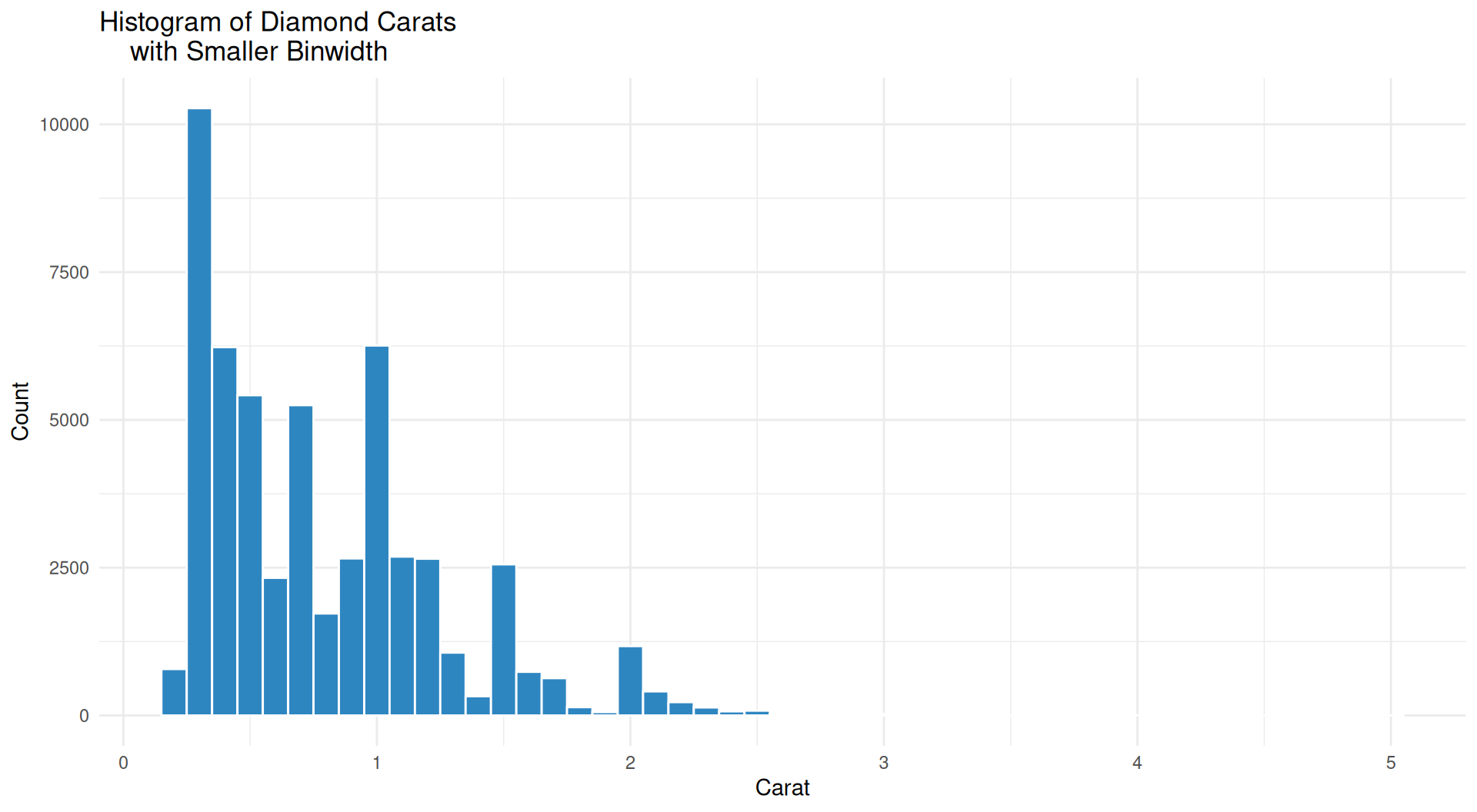
Diamonds Histogram Plot 1

Binwidth of 0.1
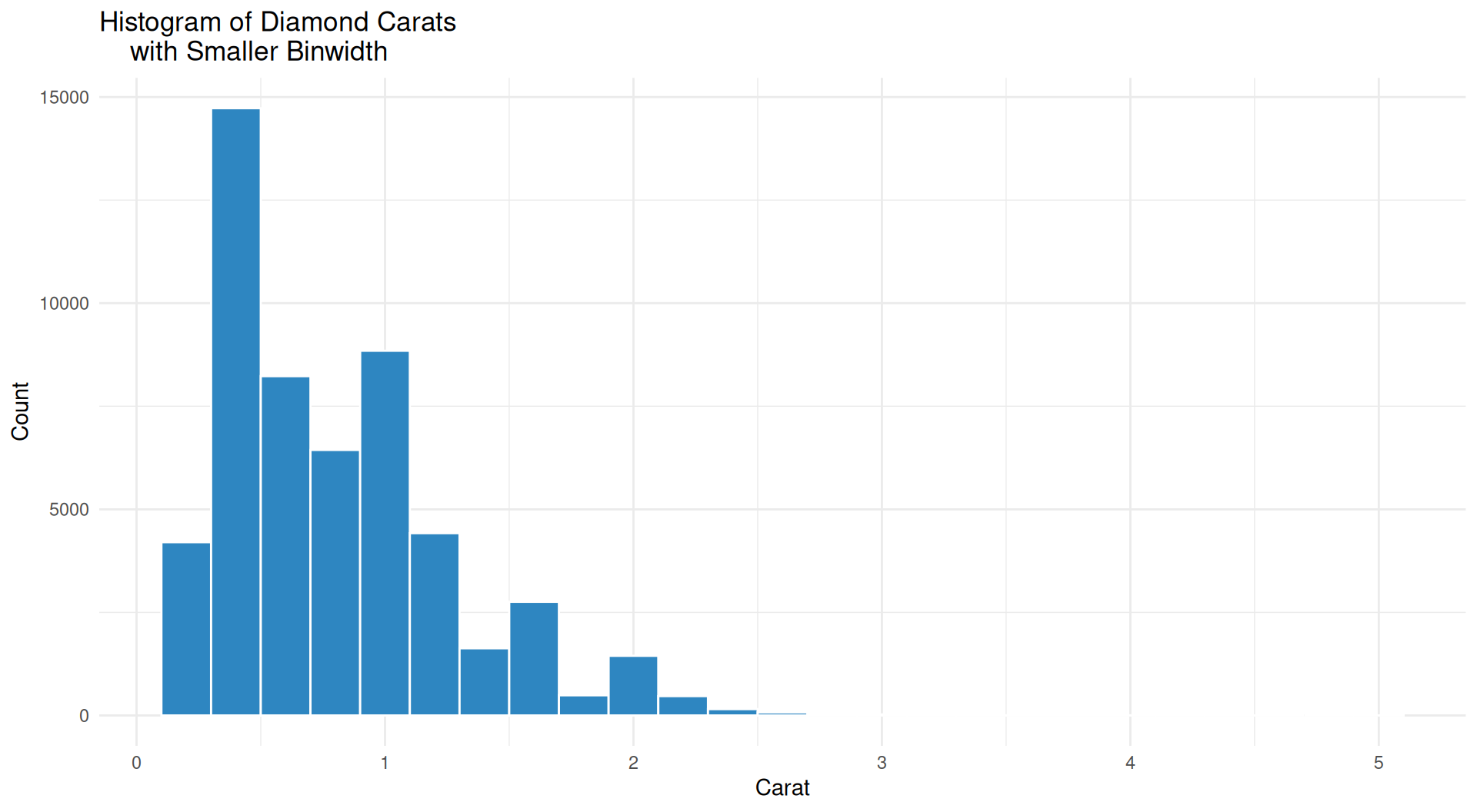
Diamonds Histogram Plot 2

Binwidth of 0.2
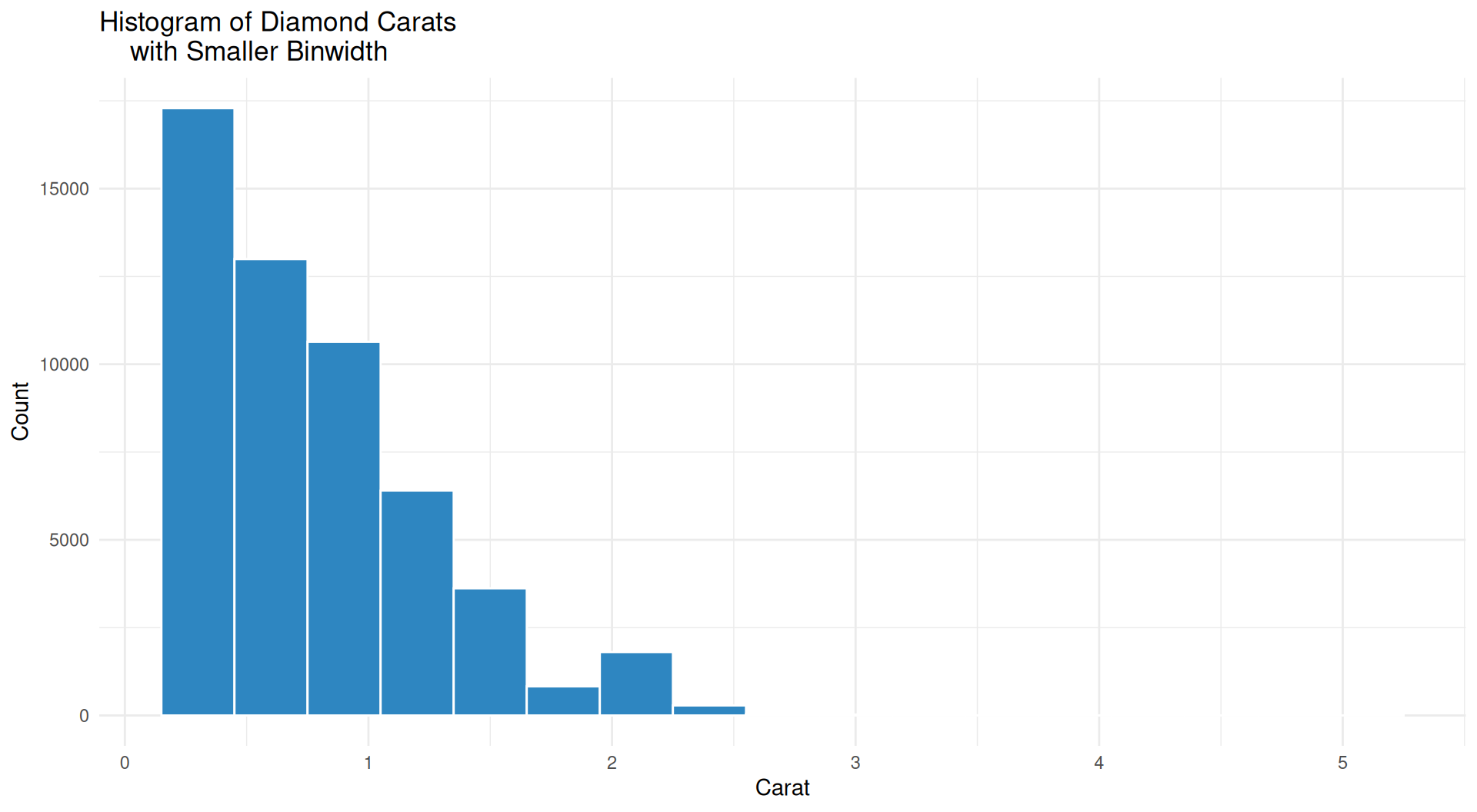
Diamonds Histogram Plot 3

Binwidth of 0.3
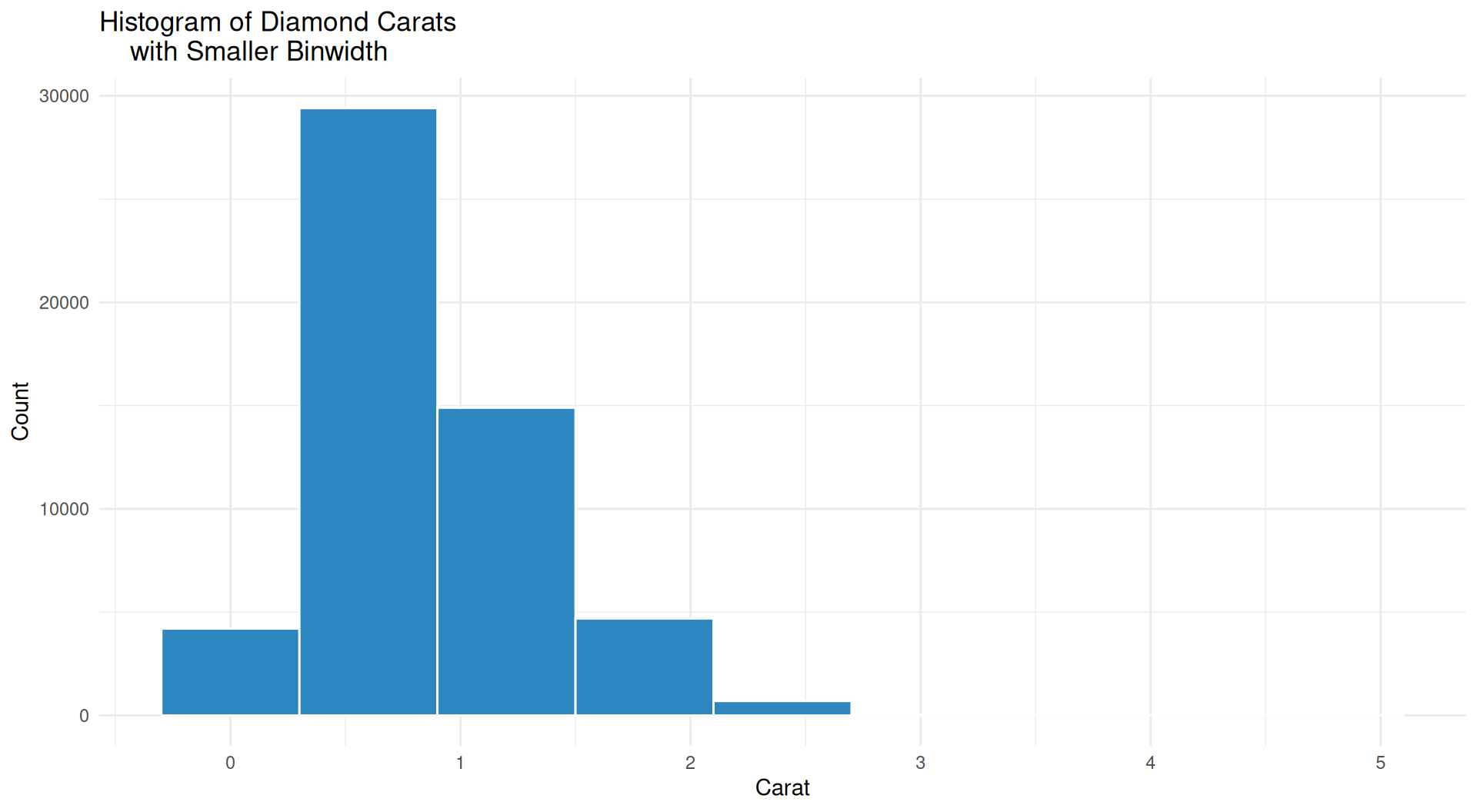
Diamonds Histogram Plot 4

Binwidth of 0.6
Diamonds Histogram Plot 5

Binwidth of 0.8
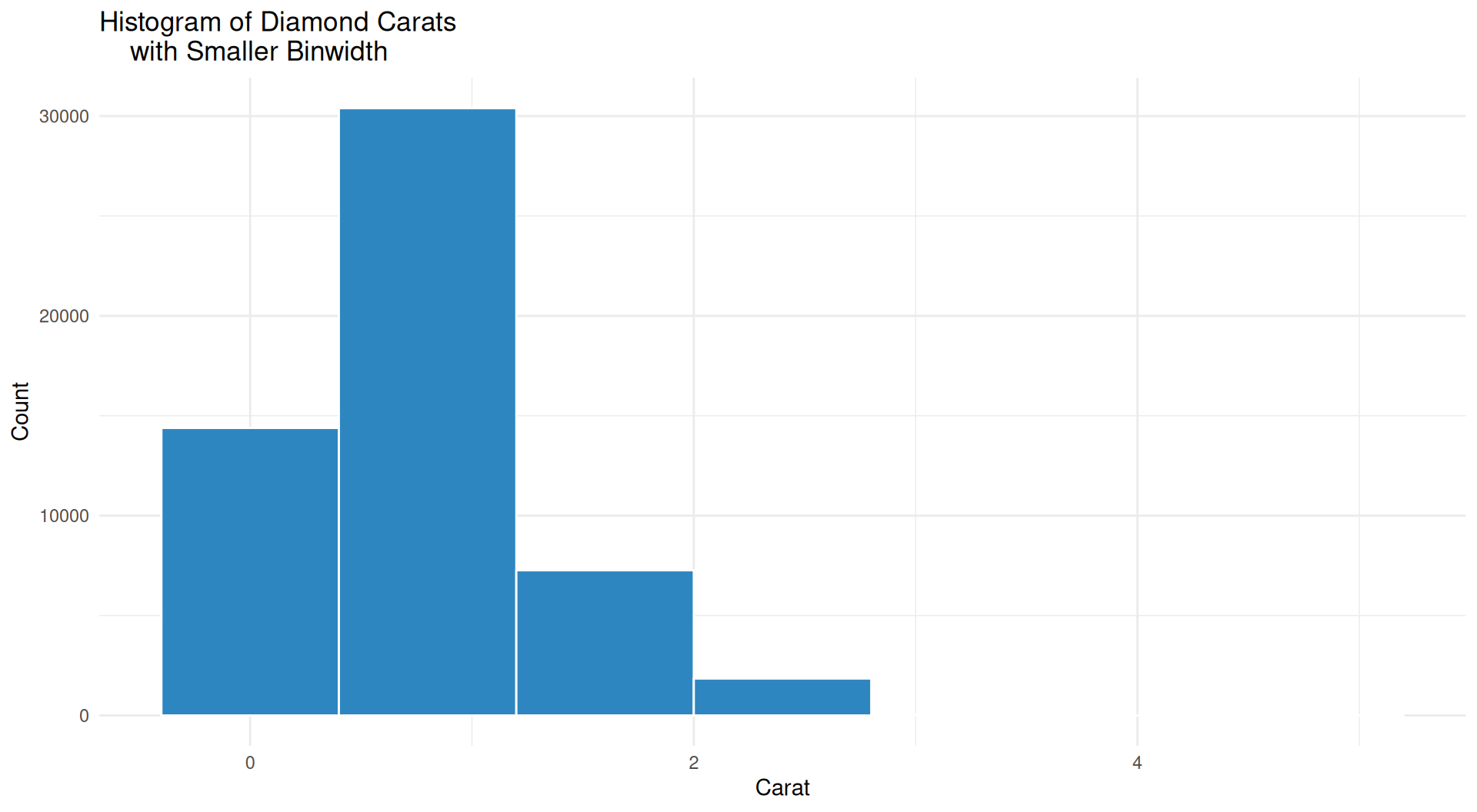
Diamonds Histogram Plot 6

Binwidth of 1
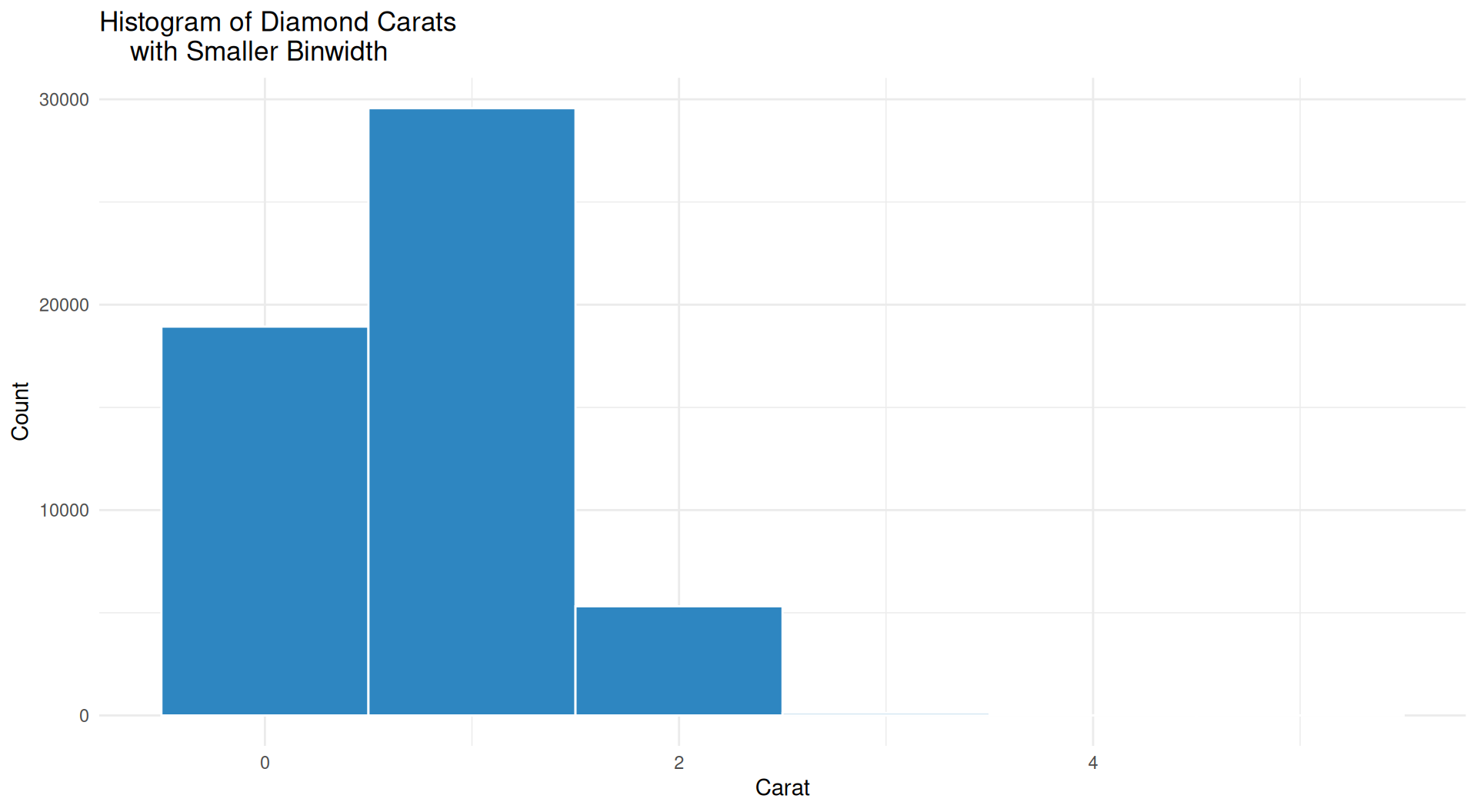
Diamonds Histogram Plot 7

Binwidth of 10
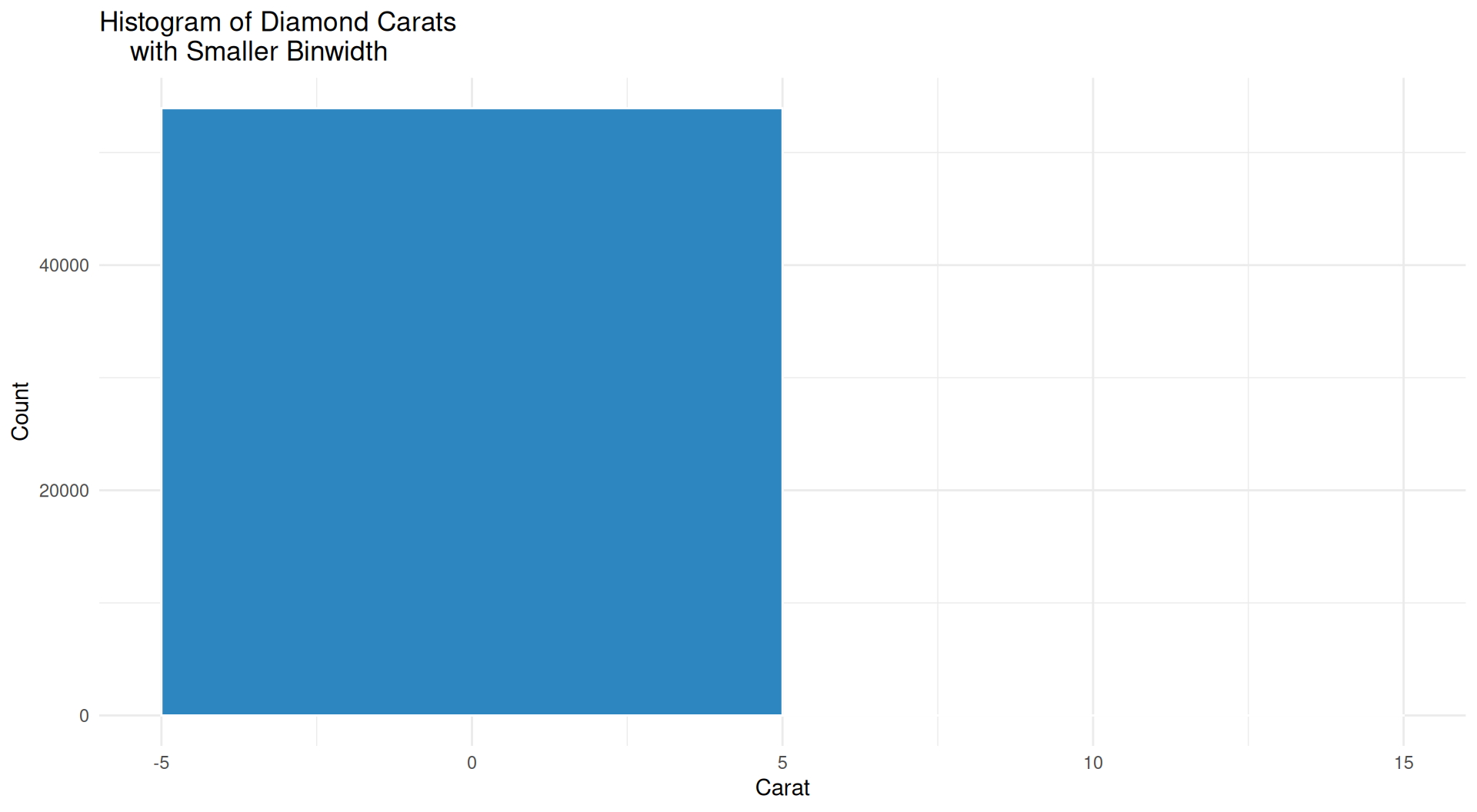
Is our data a single huge square!?

Binwidth Discussion

Note

Is our data a single huge square!? When binwidth is too large, the data appears to be aggregated into a small number of bins and the histogram loses its ability to show the true distribution of the data.

Important

  • When creating histograms, the choice of binwidth can significantly affect the appearance and interpretation of the data.

  • Smaller binwidths provide more detail but can be noisy, while larger binwidths smooth out the data but may hide important features.

  • Consider experimenting with different binwidths to find a balance that accurately represents the underlying distribution of your data.

Part 1: Probability Basics 🎯

What Does “Probability” Mean?

The long-run frequency view

P(event) = the fraction of times it happens if you repeat the experiment forever.

You cannot repeat forever — but you can repeat 100,000 times in R. 💻

Important

Key vocabulary

  • Experiment — a repeatable procedure
  • Outcome — one result
  • Event — a set of outcomes
  • Random variable — a number attached to an outcome

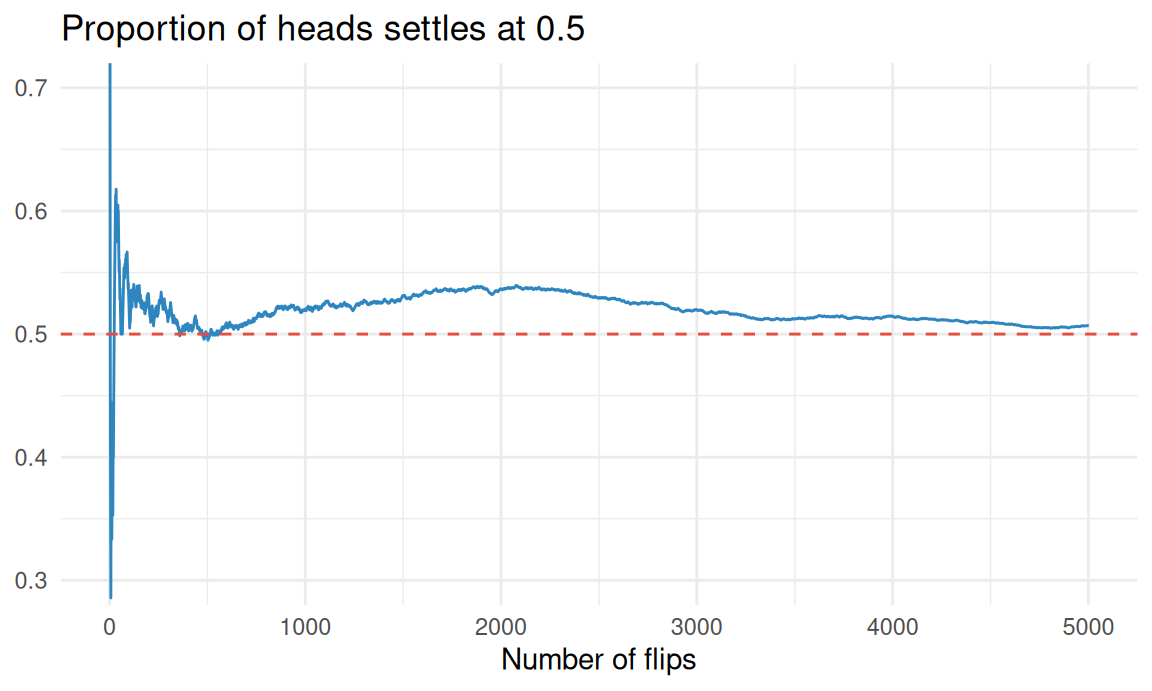
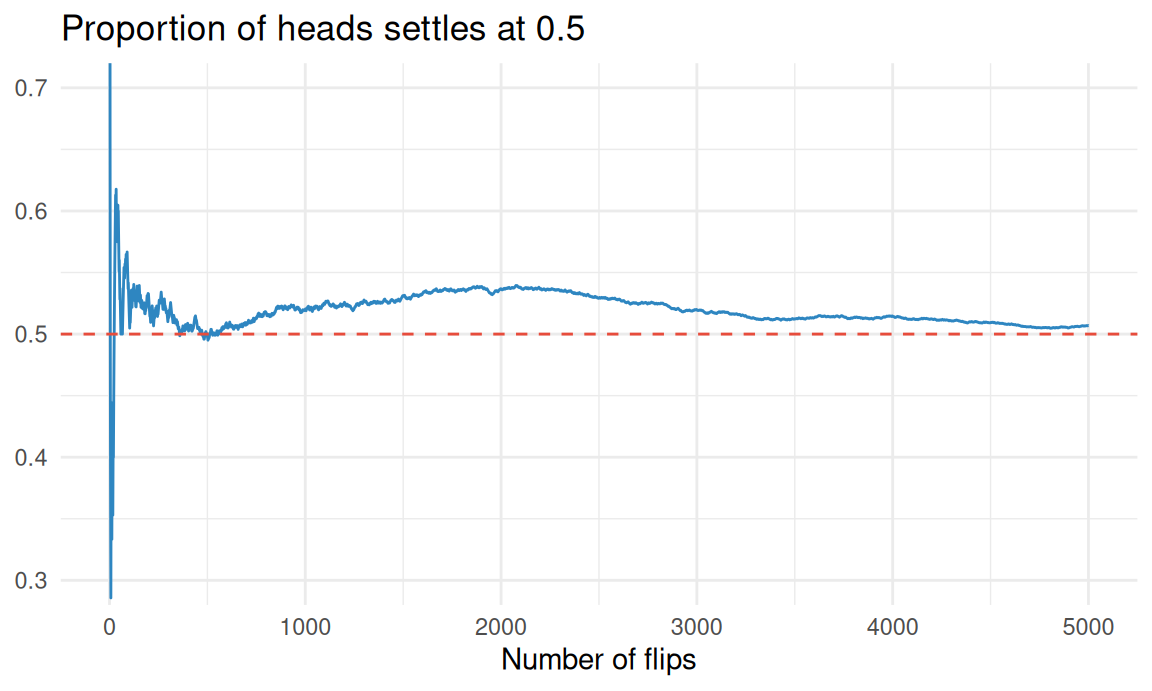
Frequency of Heads in Coin Flips

library(tidyverse)
set.seed(301)

flips <- sample(c(0, 1), 5000, replace = TRUE)

tibble(
  n = seq_along(flips),
  running = cummean(flips)
) %>%
  ggplot(aes(n, running)) +
  geom_line(color = "#2E86C1") +
  geom_hline(yintercept = 0.5,
             color = "#E74C3C",
             linetype = "dashed") +
  coord_cartesian(ylim = c(0.3, 0.7)) +
  labs(title = "Proportion of heads settles at 0.5",
       x = "Number of flips", y = NULL) +
  theme_minimal(base_size = 11)

Frequency of Heads in Coin Flips Plot
Frequency of Heads in Coin Flips Discussion

Important

Discussion Points

  • The proportion of heads tends to stabilize around 0.5 as the number of flips increases.
  • Early fluctuations are common due to randomness, but they diminish over time.
  • This illustrates the Law of Large Numbers: the average of repeated independent trials converges to the expected value.

Sampling in R (Part 1)

set.seed(301)

# Without replacement (default) - like dealing cards
sample(1:10, size = 5)
[1] 10  5  1  9  2
# With replacement - like rolling a die repeatedly
sample(1:6, size = 10, replace = TRUE)
 [1] 4 1 1 6 1 3 2 4 3 6

Sampling in R (Part 2)

# Unequal probabilities - a weighted coin
sample(c("Heads", "Tails"), size = 10, replace = TRUE, prob = c(0.8, 0.2))
 [1] "Heads" "Tails" "Heads" "Heads" "Heads" "Heads" "Heads" "Heads" "Heads"
[10] "Heads"
# Shuffle an entire vector
sample(letters[1:8])
[1] "g" "d" "a" "b" "c" "h" "e" "f"

Sampling in R (Part 3)

Sampling allows for the selection of a subset of elements from a set. Useful for simulations and resampling methods. 🔮

# Sample rows of a data frame (tidyverse)
slice_sample(iris, n = 10)
   Sepal.Length Sepal.Width Petal.Length Petal.Width    Species
1           5.7         2.5          5.0         2.0  virginica
2           6.7         3.3          5.7         2.1  virginica
3           5.1         3.5          1.4         0.3     setosa
4           5.1         2.5          3.0         1.1 versicolor
5           5.5         2.6          4.4         1.2 versicolor
6           5.5         2.3          4.0         1.3 versicolor
7           5.0         3.5          1.3         0.3     setosa
8           4.9         3.6          1.4         0.1     setosa
9           5.5         2.4          3.8         1.1 versicolor
10          6.4         2.8          5.6         2.2  virginica

Discrete vs Continuous 📊

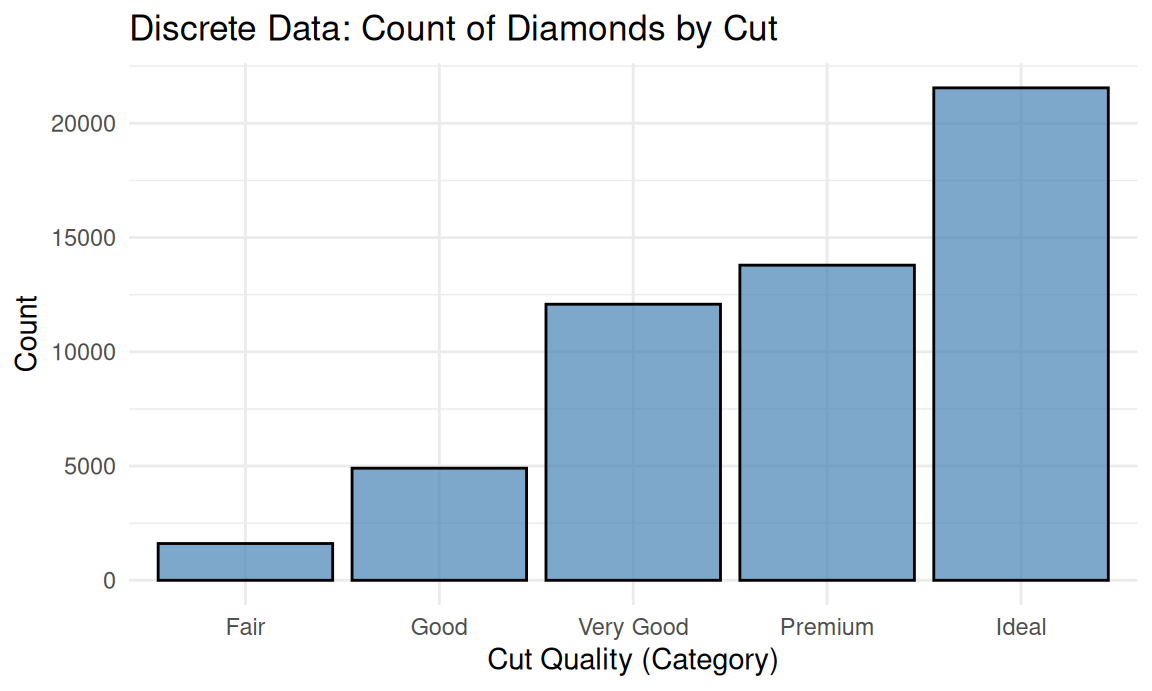
Discrete — countable outcomes

  • Number of heads in 10 flips
  • Customers arriving per hour
  • Dice totals

Described by a probability mass function: P(X = 3) is a real number.

Continuous — any value in a range

  • Height, weight, temperature
  • Time until failure

Described by a probability density function: P(X = 3.000…) = 0! Only ranges have probability. 📏

A Density Is Not a Probability

dnorm(0) returns 0.399 — that is a height, not a chance. For continuous variables, probability is area under the curve, which is what pnorm() gives you. 📐

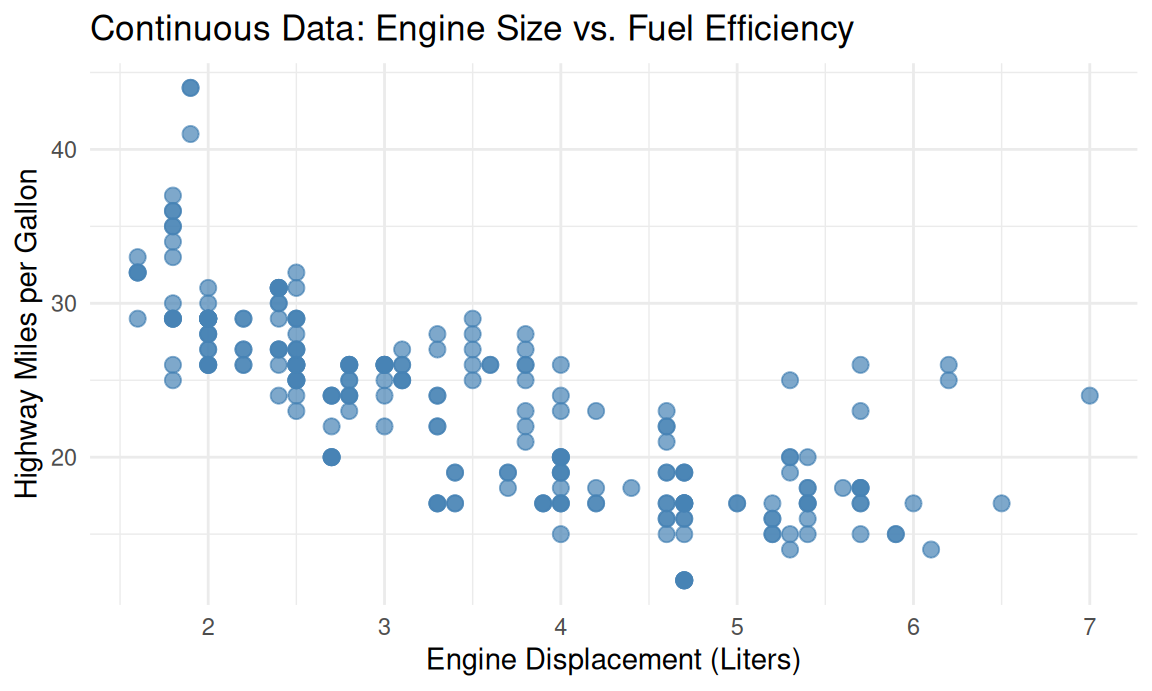
Continuous Distribution Example

library(tidyverse)

# Scatter plot of continuous data 
# (Engine displacement vs. Highway MPG)
ggplot(data = mpg, aes(x = displ, y = hwy)) +
  geom_point(color = "steelblue", size = 2.5, alpha = 0.7) +
  labs(
    title = "Continuous Data: Engine Size vs. Fuel Efficiency",
    x = "Engine Displacement (Liters)",
    y = "Highway Miles per Gallon"
  ) +
  theme_minimal()
Discrete Distribution Example

library(tidyverse)

# Bar chart of discrete data (Count of diamonds by cut quality)
ggplot(data = diamonds, aes(x = cut)) +
  geom_bar(fill = "steelblue", color = "black", alpha = 0.7) +
  labs(
    title = "Discrete Data: Count of Diamonds by Cut",
    x = "Cut Quality (Category)",
    y = "Count"
  ) + theme_minimal()
R’s Four-Letter Pattern 🔤

Every distribution in R has four functions: prefix + name

Tip

Prefix Meaning Question it answers Example
d density / mass “How likely is exactly this?” dbinom(3, 10, 0.5)
p cumulative probability “What is P(X ≤ q)?” pnorm(1.96)
q quantile (inverse of p) “Which value has p below it?” qnorm(0.975)
r random draws “Give me n random values” rnorm(100)

Distribution names: norm, binom, pois, unif, exp, t, chisq, f

The Normal Distribution

x <- seq(-4, 4, length.out = 300)

tibble(x = x, density = dnorm(x)) %>%
  ggplot(aes(x, density)) +
  geom_area(data = ~ filter(.x, x >= -1, x <= 1),
   fill = "#27AE60", alpha = 0.5) +
  geom_area(data = ~ filter(.x, x >= -2, x <= 2),
   fill = "#3498DB", alpha = 0.25) +
  geom_line(linewidth = 1) +
  annotate("text", x = 0, y = 0.15,
   label = "68%", size = 5, color = "white") +
  annotate("text", x = 1.5, y = 0.05,
   label = "95%", size = 4.5, color = "#2E86C1") +
  labs(title = "The 68-95-99.7 rule",
       subtitle = "Within 1, 2, and 3 standard deviations of the mean",
       y = "Density") +
  theme_minimal(base_size = 12)

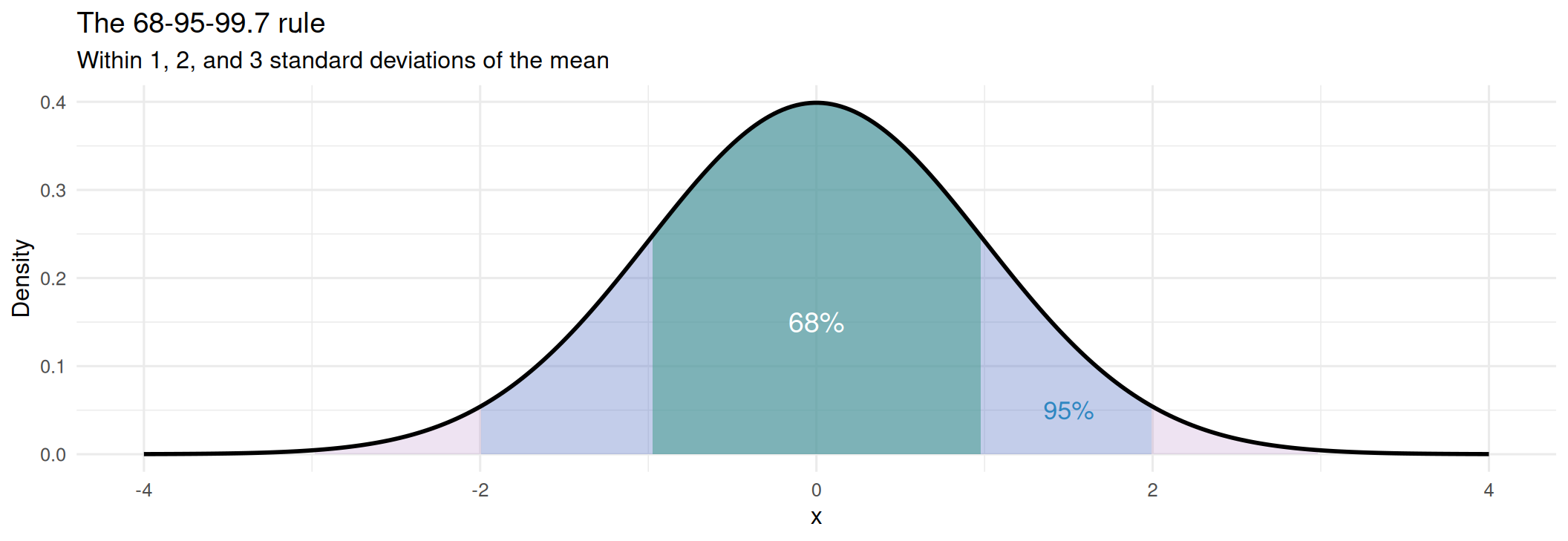
The Normal Distribution Plot 🔔

The 68-95-99.7% rules for a normal distribution:

  • 68%: Approximately 68% of observations fall within 1 standard deviation of the mean (μ ± 1σ).
    • Green shading: Approximately 68% of the distribution, from −1 to +1.
  • 95%: Approximately 95% of observations fall within 2 standard deviations of the mean (μ±2σ).
    • Purple shading: The wider interval from −2 to +2, containing approximately 95% of the distribution; it overlaps the green region.
  • 99.7%: Approximately 99.7% of observations fall within 3 standard deviations of the mean (μ±3σ).
    • The ±3 standard deviation interval is not shaded in the original code.

Working with the Normal Distribution

# Human IQ scores: mean 100, sd 15

# 1. What fraction score below 115 (cumulative 
# probability of scoring less than 115)?
pnorm(115, mean = 100, sd = 15)
[1] 0.8413447
# 2. What fraction score ABOVE 130 (cumulative 
# probability of scoring more than 130)?
pnorm(130, mean = 100, sd = 15, lower.tail = FALSE)
[1] 0.02275013
# 3. What fraction between 85 and 115 (cumulative 
# probability of scoring between 85 and 115)?
pnorm(115, 100, 15) - pnorm(85, 100, 15)
[1] 0.6826895
# 4. What score puts you in the top 1% (cumulative
# probability of scoring less than this score)?
qnorm(0.99, mean = 100, sd = 15)
[1] 134.8952
# 5. The classic 95% cutoffs on the standard normal
# (cumulative probability of scoring between these # cutoffs)
qnorm(c(0.025, 0.975))
[1] -1.959964  1.959964

Tip

z-score = (x - mean) / sd. Once standardized, every normal becomes the standard normal, and pnorm(z) answers everything. 🎯

The Binomial Distribution 🪙

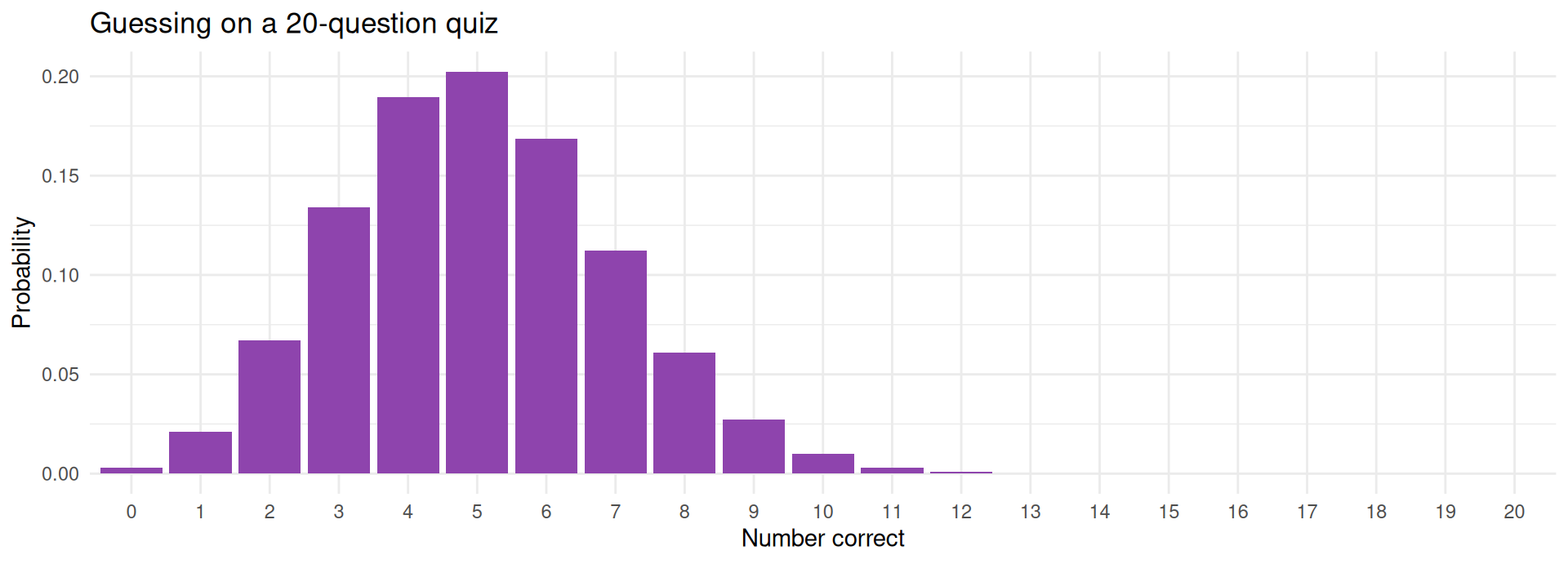
Binomial: the count of successes in n independent trials, each with probability p.

# The probability of getting exactly 5 correct answers 
# out of 20 questions when guessing randomly on a 
# multiple-choice quiz with 4 options per question?
# P(exactly 5 correct)
dbinom(5, size = 20, prob = 0.25)
[1] 0.2023312
# The probability of getting 10 or more correct answers 
# out of 20 questions when randomly guessing on a 
# multiple-choice quiz with 4 options per question?
# P(10 or more correct). Note, `lower.tail = FALSE`
# calculates the probability of getting more than 
# 9 correct, rather than 9 or fewer.
pbinom(9, 20, 0.25, lower.tail = FALSE)
[1] 0.01386442
tibble(k = 0:20,
       p = dbinom(0:20, 20, 0.25)) %>%
  ggplot(aes(factor(k), p)) +
  geom_col(fill = "#8E44AD") +
  labs(title = "Guessing on a 20-question quiz",
       x = "Number correct",
       y = "Probability") +
  theme_minimal(base_size = 11)

The Poisson Distribution

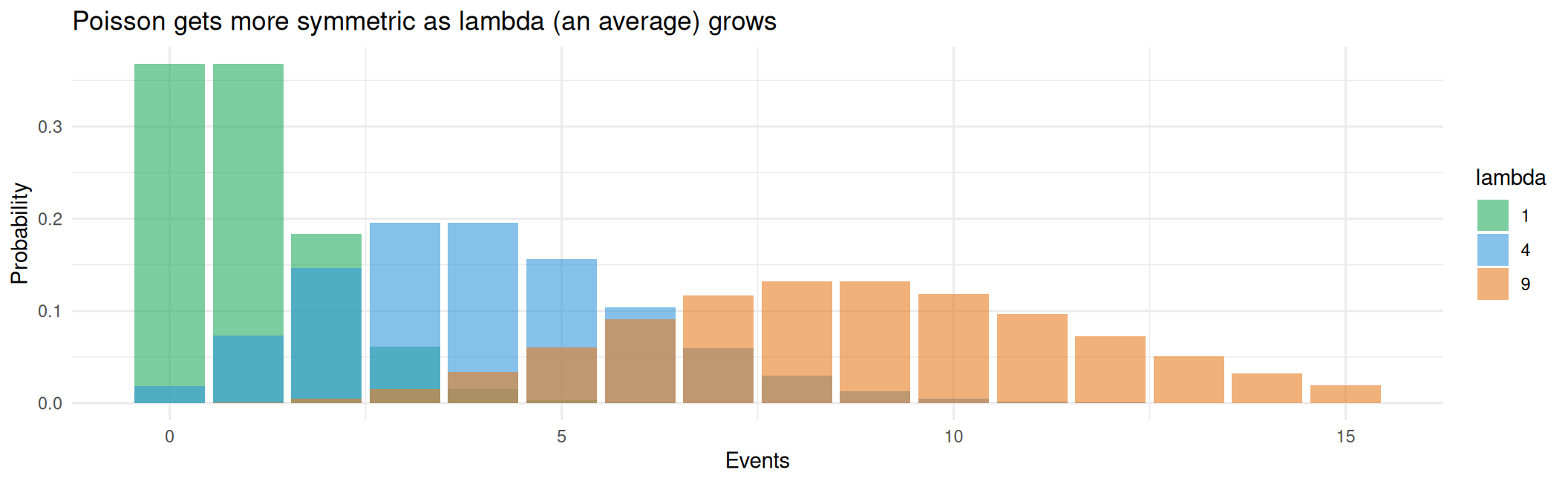
Poisson: the count of events in a fixed window, given an average rate lambda. Calls per hour, typos per page, goals per match.

# A help desk receives 4 calls per hour on average

cat("P(exactly 4 calls):", round(dpois(4, lambda = 4), 4), "\n")
P(exactly 4 calls): 0.1954 
cat("P(more than 8):    ", round(ppois(8, 4, lower.tail = FALSE), 4), "\n")
P(more than 8):     0.0214 
cat("Busiest 5% of hours start at:", qpois(0.95, 4), "calls\n")
Busiest 5% of hours start at: 8 calls

Poisson Distribution Plot

tibble(k = rep(0:15, 3),
       lambda = rep(c(1, 4, 9), each = 16)) %>%
  mutate(p = dpois(k, lambda)) %>%
  ggplot(aes(k, p, fill = factor(lambda))) +
  geom_col(position = "identity", alpha = 0.6) +
  scale_fill_manual(values = c("#27AE60", "#3498DB", "#E67E22")) +
  labs(title = "Poisson gets more symmetric as lambda (an average) grows",
       fill = "lambda", x = "Events", y = "Probability") +
  theme_minimal(base_size = 11)
Choosing a Distribution 🗺️

Your question Distribution R name
Successes out of \(n\) trials Binomial binom
Events per unit time Poisson pois
Measurement with a bell shape Normal norm
Equally likely over a range Uniform unif
Waiting time until an event Exponential exp
Small-sample mean (sd unknown) Student’s t t
Counts in a contingency table Chi-square chisq
Comparing variances (ANOVA) F f

Warning

Real data is never exactly any of these. These are useful models, not laws of nature. Always plot your data against the assumed shape. 📊

Interactive: Distribution Explorer 🎮

📐 Distribution Explorer

Pick a distribution and click "Generate Code"!

Knowledge Check 🧠

You want the IQ score that only the top 5% exceed (mean 100, sd 15). Which call do you need?
dnorm(0.95, 100, 15)
pnorm(0.95, 100, 15)
qnorm(0.95, 100, 15)
rnorm(0.95, 100, 15)

Part 2: Sampling & the Central Limit Theorem (CLT)

Uuuhhh, What is the Central Limit Theorem?

Important

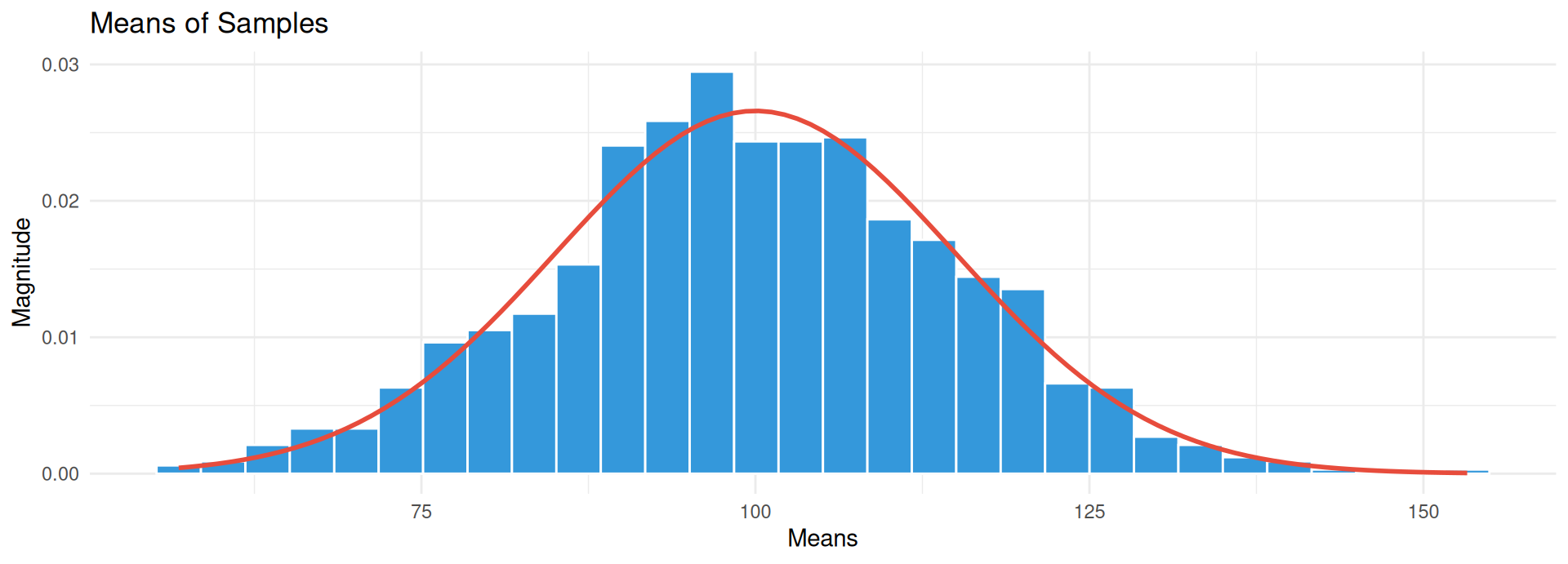
The central limit theorem establishes that when independent events are added the sum tends toward a normal distribution (a bell curve) even if the original variables themselves are not normally distributed.
For Example

If you repeatedly roll a die and take the average of the rolls, the distribution of those averages will approach a normal distribution as the number of rolls increases, regardless of the uniform distribution of a single die roll.
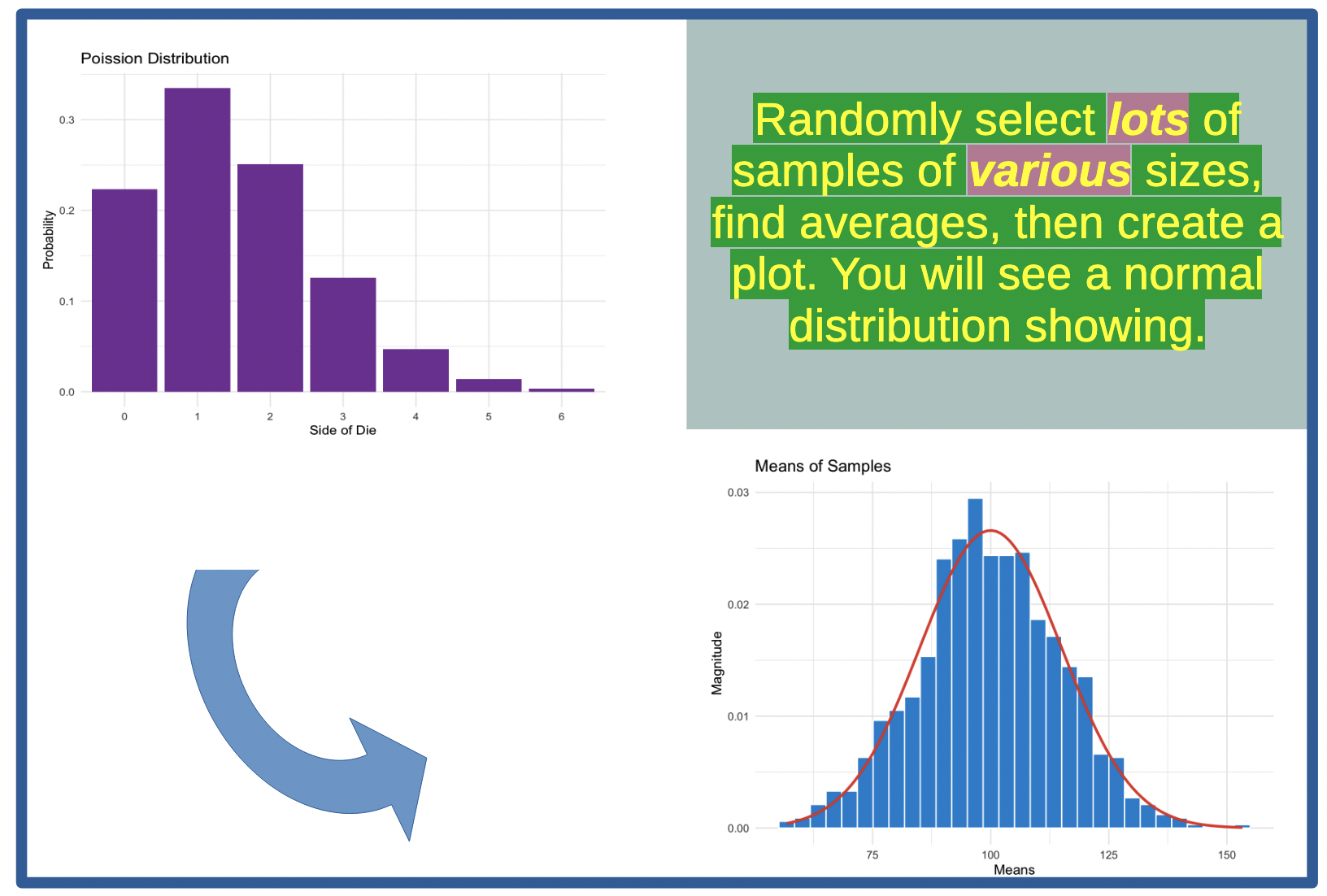
An Example Central Limit Theorem?
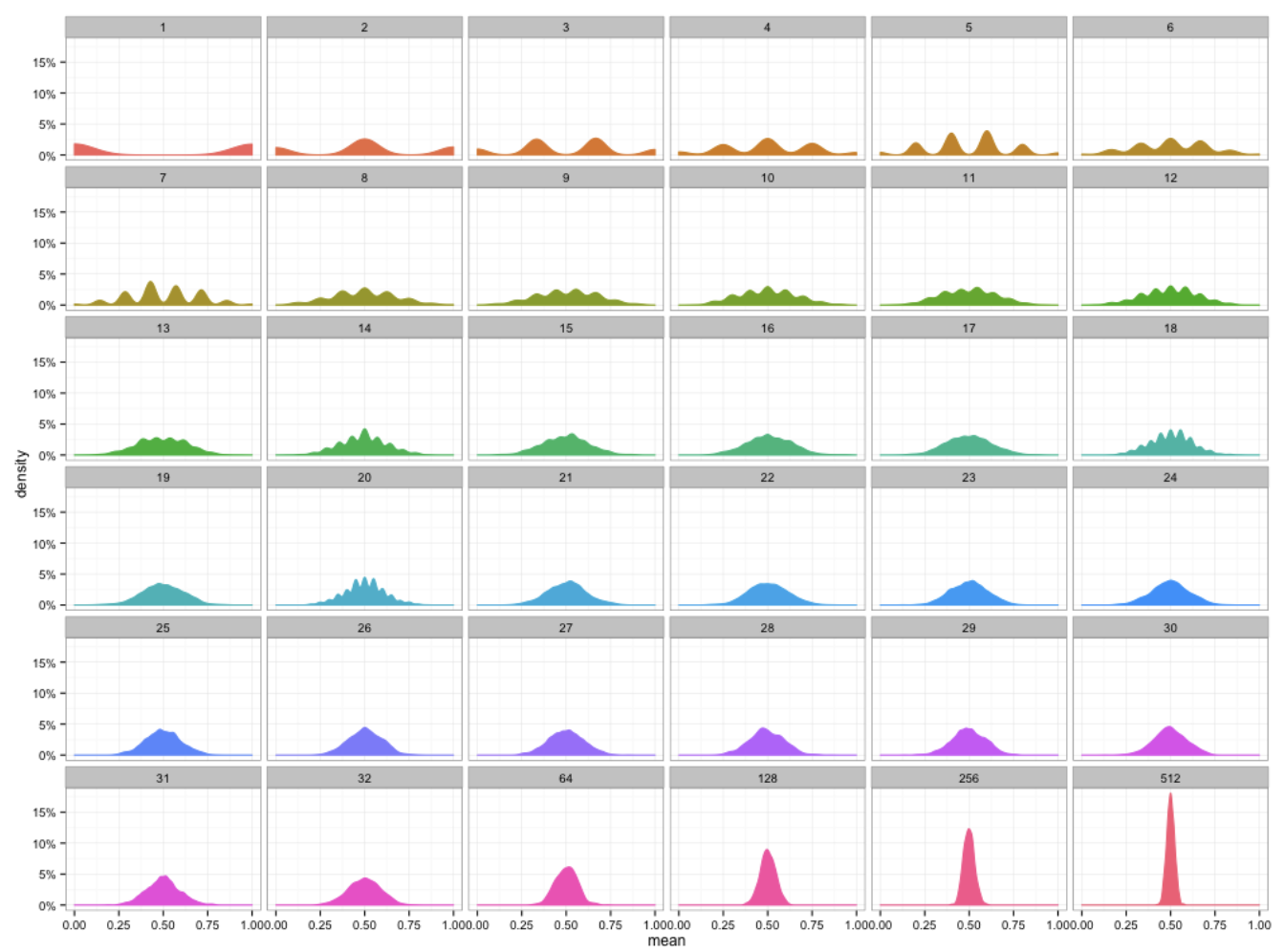
Random 0s and 1s were generated, and then their means calculated for sample sizes ranging from 1 to 512. Note that as the sample size increases the tails become thinner and the distribution becomes more concentrated around the mean. Ref: https://www.ml-science.com/central-limit-theorem

Population vs Sample

Population — everyone you care about

Parameters (usually unknown):

  • μ (mu) = population mean
  • σ (sigma) = population sd

Sample — who you actually measured

Statistics (computed from data):

  • x̄ = sample mean
  • s = sample sd

The Central Question

Your sample mean is not the population mean. How far off might it be? Everything in Weeks 8-10 answers that question. 🎯

Warning

Who is in your population? A “national” survey that samples only landline owners has a population you did not intend. Sampling frames encode bias before a single number is computed. ⚖️
Samples Vary

set.seed(301)

# Our "population": 100,000 adults with mean height 170cm, sd 10
population <- rnorm(100000, mean = 170, sd = 10)
mean(population)
[1] 169.9861
# Take three samples of 25 people each
mean(sample(population, 25))
[1] 171.1858
mean(sample(population, 25))
[1] 170.9592
mean(sample(population, 25))
[1] 171.029

Note

Same population, same method, three different answers. That spread is the thing statistics measures. 📏

The Sampling Distribution Part 1

set.seed(301)

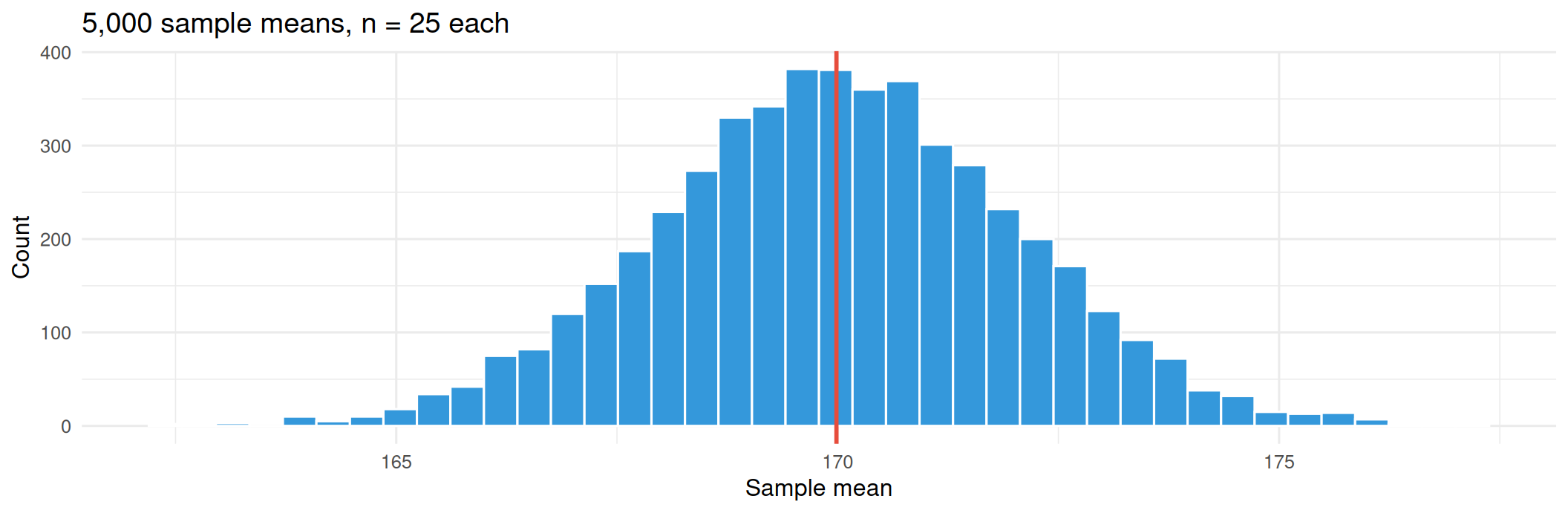
# Repeat "take a sample of 25, record the mean" 5,000 times
sample_means <- replicate(5000, mean(sample(population, 25)))

cat("Population mean:      ", round(mean(population), 2), "\n")
Population mean:       169.99 
cat("Mean of sample means: ", round(mean(sample_means), 2), "\n")
Mean of sample means:  170 
cat("SD of sample means:   ", round(sd(sample_means), 2), "\n")
SD of sample means:    2.04 
cat("Theory: sigma/sqrt(n) =", round(10 / sqrt(25), 2), "\n")
Theory: sigma/sqrt(n) = 2 

The Sampling Distribution Part 2

set.seed(301)

# Repeat "take a sample of 25, record the mean" 5,000 times
sample_means <- replicate(5000, mean(sample(population, 25)))

ggplot(tibble(m = sample_means), aes(m)) +
  geom_histogram(bins = 40, fill = "#3498DB", color = "white") +
  geom_vline(xintercept = mean(population), color = "#E74C3C", linewidth = 1) +
  labs(title = "5,000 sample means, n = 25 each",
       x = "Sample mean", y = "Count") +
  theme_minimal(base_size = 12)
The Sampling Distribution Discussion

Note

Key Takeaways

  • The sampling distribution of the sample mean is the distribution of all possible sample means that could be obtained from a population. It is a theoretical distribution that describes how the sample mean varies from sample to sample.

  • Intuitively, as the sample size increases, the variability of the sample means decreases. This is because larger samples provide more information about the population, leading to more precise estimates of the population mean.

Your Sample Mean May Not Be the Population Mean

set.seed(301)

# Our "population": 100,000 adults with mean height 170cm, sd 10
population <- rnorm(100000, mean = 170, sd = 10)

# Take a single sample of 25 people
sample_mean <- mean(sample(population, 25))

cat("Population mean:      ", round(mean(population), 2), "\n")
Population mean:       169.99 
cat("Sample mean:        ", round(sample_mean, 2), "\n")
Sample mean:         171.19 

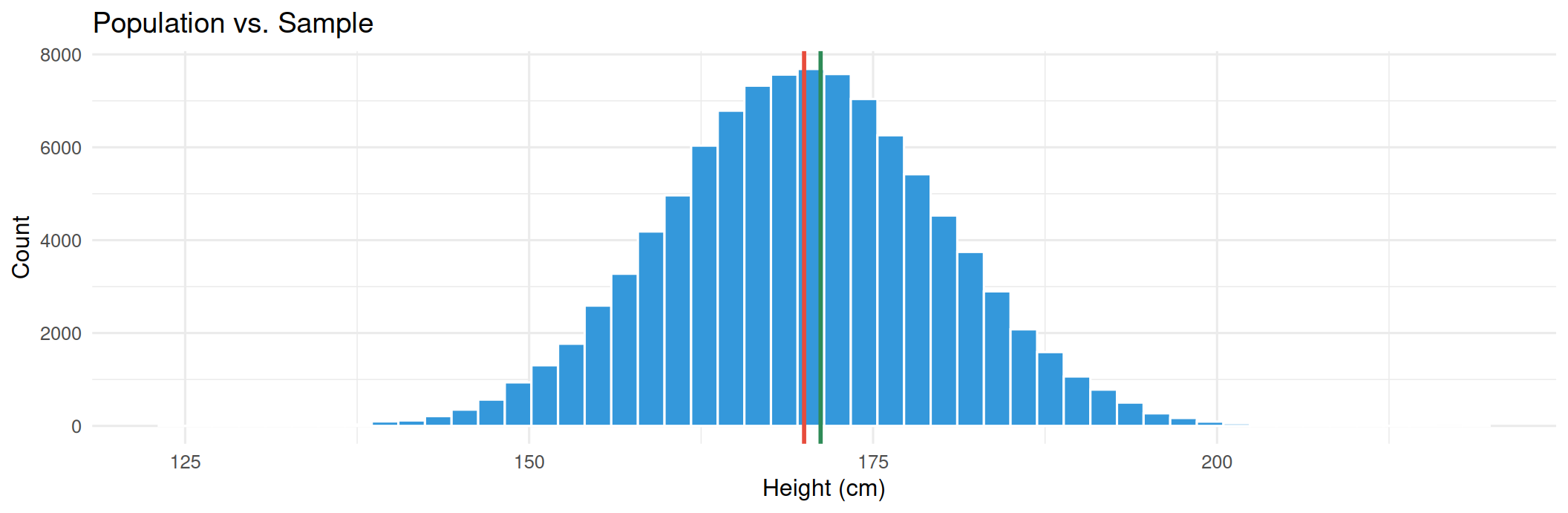
Visualizing the Difference

set.seed(301)

# Our "population": 100,000 adults with mean height 170cm, sd 10
population <- rnorm(100000, mean = 170, sd = 10)

# Take a single sample of 25 people
sample_mean <- mean(sample(population, 25))

ggplot(tibble(x = population), aes(x)) +
  geom_histogram(bins = 50, fill = "#3498DB", color = "white") +
  geom_vline(xintercept = mean(population), color = "#E74C3C", linewidth = 1) +
  geom_vline(xintercept = sample_mean, color = "#2E8B57", linewidth = 1) +
  labs(title = "Population vs. Sample",
       x = "Height (cm)", y = "Count") +
  theme_minimal(base_size = 12)
Visualizing the Difference Plot
Important

A plot of sample means taken from a population of adults with a true mean height of 170cm. The red line represents the population mean, while the green line represents the mean of a single sample (one “lucky” sample that we selected to plot in this example).

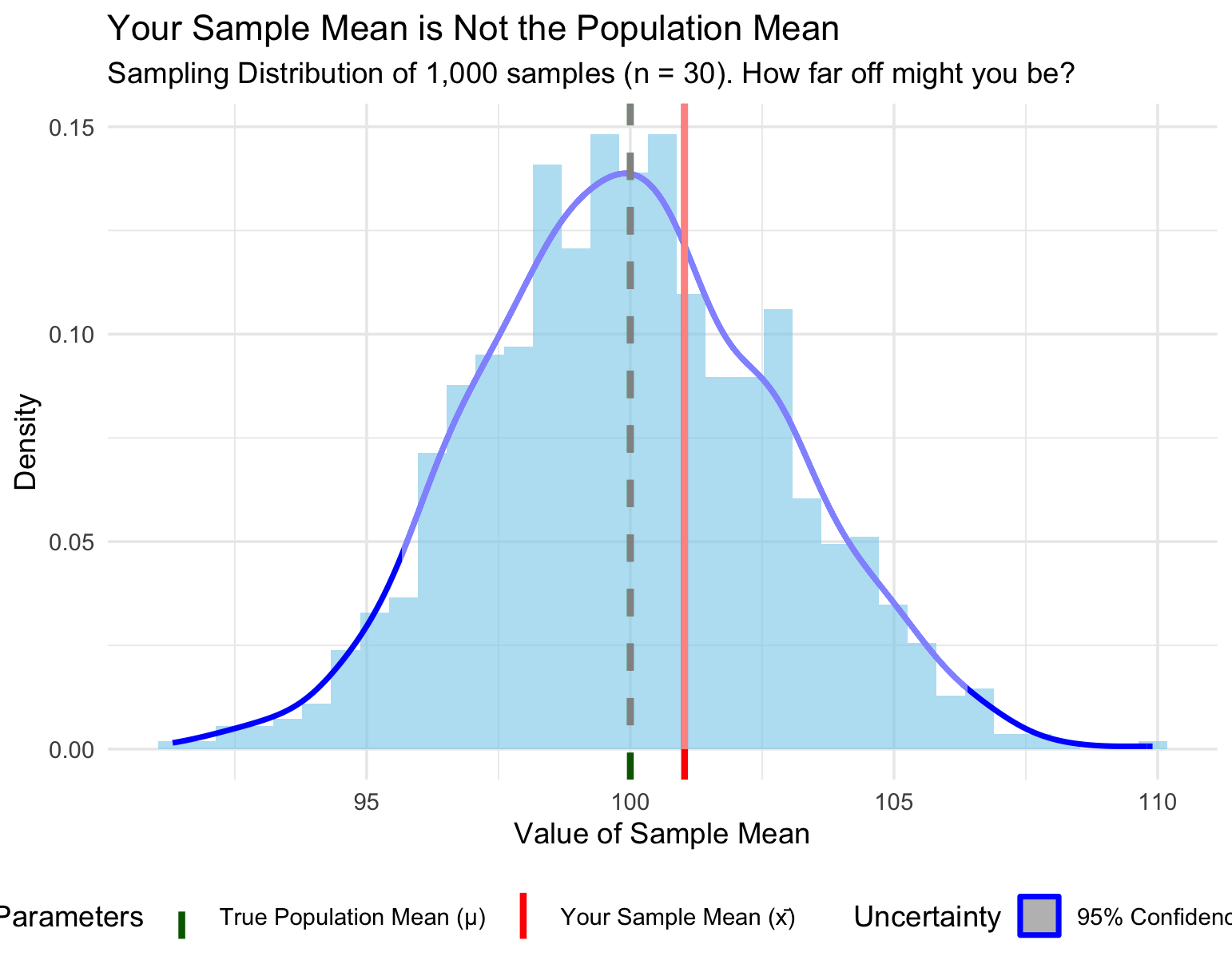
Another View Sample Means != Population Mean!!

# Load libraries
library(ggplot2)
library(dplyr)

# 1. Set up the parameters
set.seed(42)
pop_mean <- 100        # True Population Mean (μ)
pop_sd <- 15           # Population Standard Deviation (σ)
sample_size <- 30      # Sample size (n)

# 2. Simulate 1,000 different samples of size n
# and calculate their means
simulated_samples <- tibble(
  sample_id = 1:1000
) %>%
  rowwise() %>%
  mutate(
    # Pull a random sample and compute its mean
    sample_mean = mean(rnorm(sample_size, 
                      mean = pop_mean,
                      sd = pop_sd))
  ) %>%
  ungroup()

# Calculate the Standard Error (SE = σ / √n)
standard_error <- pop_sd / sqrt(sample_size)

# Highlight one specific "lucky" sample to show 
# how it differs from the truth
single_sample_mean <- simulated_samples$sample_mean[1]
ci_lower <- single_sample_mean - (1.96 * standard_error)
ci_upper <- single_sample_mean + (1.96 * standard_error)

# 3. Create the ggplot
ggplot(simulated_samples, aes(x = sample_mean)) +
  # Distribution of all possible sample means
  geom_histogram(aes(y = ..density..),
    bins = 35,
    fill = "skyblue",
    alpha = 0.6) +
  geom_density(color = "blue", size = 1) +
  
  # True Population Mean Line (The Truth 🎯)
  geom_vline(aes(xintercept = pop_mean,
             color = "True Population Mean (μ)"), 
             linetype = "dashed", size = 1.2) +
  
  # Our Single Sample Mean (The Estimate 📍)
  geom_vline(aes(xintercept = single_sample_mean, 
                      color = "Your Sample Mean (x̄)"), 
             size = 1.2) +
  
  # Confidence Interval Bracket for that single sample
  geom_rect(aes(xmin = ci_lower, xmax = ci_upper,
                ymin = 0,
                ymax = Inf, 
                fill = "95% Confidence Interval"), 
            alpha = 0.005) +
  
  # Custom Formatting
  scale_color_manual(name = "Parameters",
    values = c("True Population Mean (μ)" = "darkgreen",
    "Your Sample Mean (x̄)" = "red")) +
  scale_fill_manual(name = "Uncertainty",
    values = c("95% Confidence Interval" = "gray")) +
  labs(
    title = "Your Sample Mean is Not the Population Mean",
    subtitle = paste0("Sampling Distribution of 1,000 samples (n = ", sample_size, "). How far off might you be?"),
    x = "Value of Sample Mean",
    y = "Density"
  ) +
  theme_minimal() +
  theme(legend.position = "bottom")

Another View Sample Means != Population Mean Plot!!
Is There a Way to Predict The Error in Our Sample Mean?

Standard Error: The Key Formula 🔑

Important

SE = σ / √n (in practice: s / √n for s = sample standard deviation and n = sample size.

What is Standard Error? The standard deviation of the sample mean — how much your estimate wobbles.

SE is the standard deviation of the means of the samples drawn from the population and is a measurement of how much variability there is in the sample means.

More on that SE Thing

  • The smaller the SE, the more precise your estimate of the population mean is.
  • It shrinks as your sample size grows larger.

Standard Error: Table

se_table <- tibble(n = c(4, 16, 25, 100, 400, 1600)) %>%
  mutate(standardError = 10 / sqrt(n))
se_table
# A tibble: 6 × 2
      n standardError
  <dbl>         <dbl>
1     4          5   
2    16          2.5 
3    25          2   
4   100          1   
5   400          0.5 
6  1600          0.25

Standard Error: Plot

se_table <- tibble(n = c(4, 16, 25, 100, 400, 1600)) %>%
  mutate(standardError = 10 / sqrt(n))

ggplot(se_table, aes(n, standardError)) +
  geom_line(color = "#8E44AD", linewidth = 1) +
  geom_point(size = 3, color = "#8E44AD") +
  labs(title = "Diminishing returns: quadruple n to halve the error",
       x = "Sample size", y = "Standard error") +
  theme_minimal(base_size = 12)
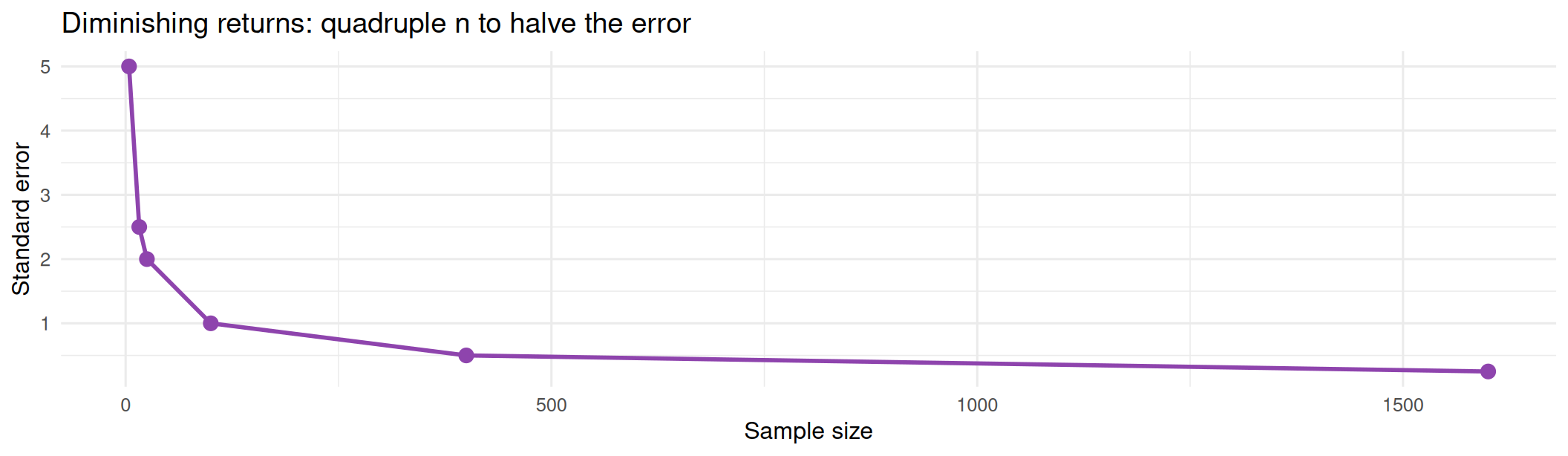
Notice that the smaller the SE, the more precise your estimate of the population mean is. Want twice the precision? You need four times the data.

The Central Limit Theorem

The Most Surprising Result in Statistics

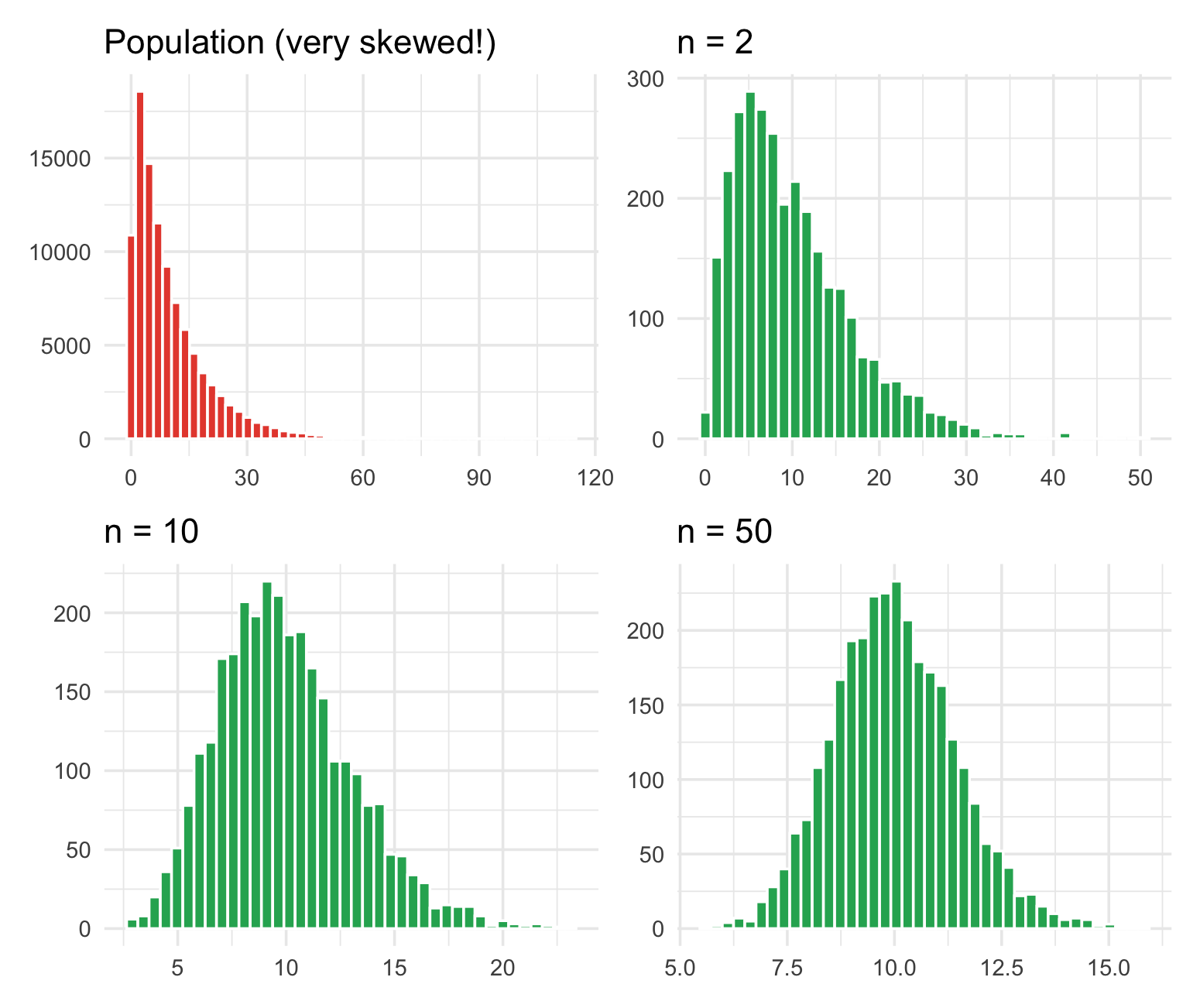
No matter how weird the population’s shape, the distribution of sample means approaches a normal curve as n grows.

library(patchwork)
set.seed(301)

# A wildly skewed population
pop <- rexp(100000, rate = 0.1)

clt_plot <- function(n) {
  means <- replicate(3000, mean(sample(pop, n)))
  ggplot(tibble(m = means), aes(m)) +
    geom_histogram(bins = 40, fill = "#27AE60", color = "white") +
    labs(title = paste("n =", n), x = NULL, y = NULL) +
    theme_minimal(base_size = 11)
}

p0 <- ggplot(tibble(x = pop), aes(x)) +
  geom_histogram(bins = 50, fill = "#E74C3C", color = "white") +
  labs(title = "Population (very skewed!)", x = NULL, y = NULL) +
  theme_minimal(base_size = 11)

(p0 + clt_plot(2)) / (clt_plot(10) + clt_plot(50))

The Central Limit Theorem Plot

Why the CLT Matters

What it buys you

✅ You can use normal-based methods on non-normal data
✅ Confidence intervals work for almost any variable
✅ t-tests and ANOVA (coming up!) rest on this
✅ It explains why so many real measurements look bell-shaped

The fine print

⚠️ It is about means, not individual values
⚠️ “Large enough n” depends on how skewed the population is (n ≥ 30 is a rule of thumb, not a law)
⚠️ It assumes independent observations
⚠️ Heavy tails (a few enormous values) need much larger n

Warning

The CLT does not make your data normal. It makes the sampling distribution of the mean approximately normal. Those are very different claims. 🎓

Interactive: CLT Simulator 🎮

✨ Central Limit Theorem Simulator

Choose a population and click "Generate Simulation"!